Know exactly what light to bring before you step on set
Real photometric data for 200+ professional fixtures. Calculate lux, T-stop and power draw instantly — no spreadsheets, no guesswork, no surprises on set.
Available on the App Store



1200D
ISO
Frame rate (fps)
Shutter angle
T-Stop
ND
Exp. offset (stops)
Featured on





The problem
Pre-production lighting is still done on gut instinct
Even experienced DPs rely on memory, rough numbers and hope. The data has always existed — it just was never accessible in one place, in real time, on any device.
Hours lost to research
Hunting spec sheets, cross-referencing ARRI vs Aputure vs Mole-Richardson to figure out if a 300W LED gives you enough stop — before you've even touched a camera.
Surprises on set
You planned for a 6m throw. The location has 20ft ceilings and bounce-only options. You improvise — but your schedule collapses. The data was always available. You just didn't have it.
Over-ordering to stay safe
Not sure the 300D is enough? Book the 600D too — just in case. Budget doubles, the truck gets heavier and half the gear goes back untouched. Every. Single. Time.
The fix
Replace guesswork with numbers
LightCalc applies the inverse square law to real manufacturer photometric data — lux-at-1m values from spec sheets — to calculate exact lux output, T-stop equivalent and power draw for any fixture, modifier and diffusion combination at any distance. In seconds.
See it in motion
Ask LightCalc anything
Two of the hundreds of questions LightCalc answers instantly, every time you open it.
Instantly compare stop output between any two of LightCalc’s 200+ supported fixtures.
Answered instantly — modifier, distance and diffusion included.
Instantly know how much light you need for any T-stop, frame rate and ISO combination.
Type in your camera settings — get exact lux and power draw in return.
How it works
From fixture selection to shoot-ready plan in minutes
LightCalc replaces the spreadsheet, the spec-sheet hunt and the on-set calculator. Three steps is all it takes.
Select your fixture, modifier & scene
Choose from 200+ fixtures with real photometric data — LEDs, HMIs, Tungsten, Tubes, Panels. Add your modifier (Fresnel, lens, reflector) and pick a diffusion material from 30+ real-world fabrics.
ARRI Orbiter · Aputure 600D · Mole 18k HMI · Astera Titan Tube · LiteGear LiteMat 4 — and hundreds more.
Get instant, real-world calculations
Set subject distance and ambient scenario. LightCalc returns the exact lux output at subject, T-stop equivalent, stop delta vs ambient and total power draw — calculated using the inverse square law applied to photometric lux-at-1m data — not approximations.
Output updates live as you adjust distance, dimmer, diffusion or camera settings.
Save your plan and shoot with confidence
Store multiple looks per project, export a PDF shoot plan for your crew or share a view-only link. Use the visual scene editor to map your lighting overhead and verify coverage before you load the truck.
Works offline. No internet needed on set.
New
LightCalc, now in your pocket.
The full LightCalc calculator — T-stop math, circuit power, fixture setup — is now an iPhone app built for set, with full offline functionality. Project changes queue automatically and sync the moment you're back online — same account, same projects, wherever you're shooting.
Download on the App StoreRequires a Plus subscription — manage your plan at lightcalc.io to avoid Apple's 30% in-app purchase fee.
What you get
Every number you need to walk onto set with confidence
LightCalc isn't a reference chart — it's a live calculator. Change any input and every output updates instantly.
Lux / foot-candles at subject
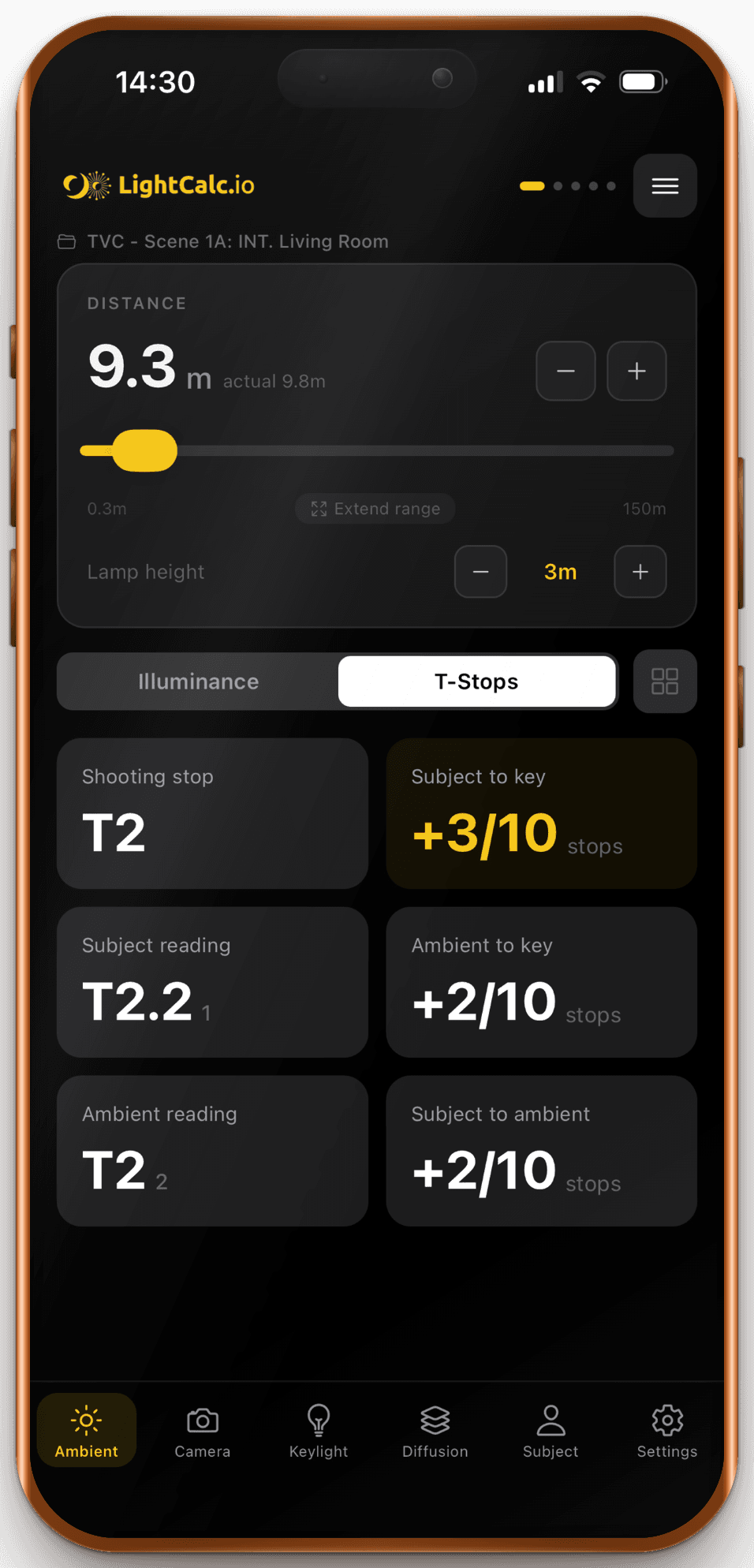
Exact illuminance at your subject distance, accounting for the inverse-square law, modifier output and diffusion loss. Switch between lux and fc instantly.
T-stop / f-stop equivalent
The aperture you need to expose the subject correctly at your chosen ISO and shutter. Dial in your camera settings and get the exact exposure in one screen.
Stop delta vs ambient
How many stops your key is above or below your selected ambient scenario — so you know instantly whether the light will read as motivated, flat or overexposed against the environment.
Power draw
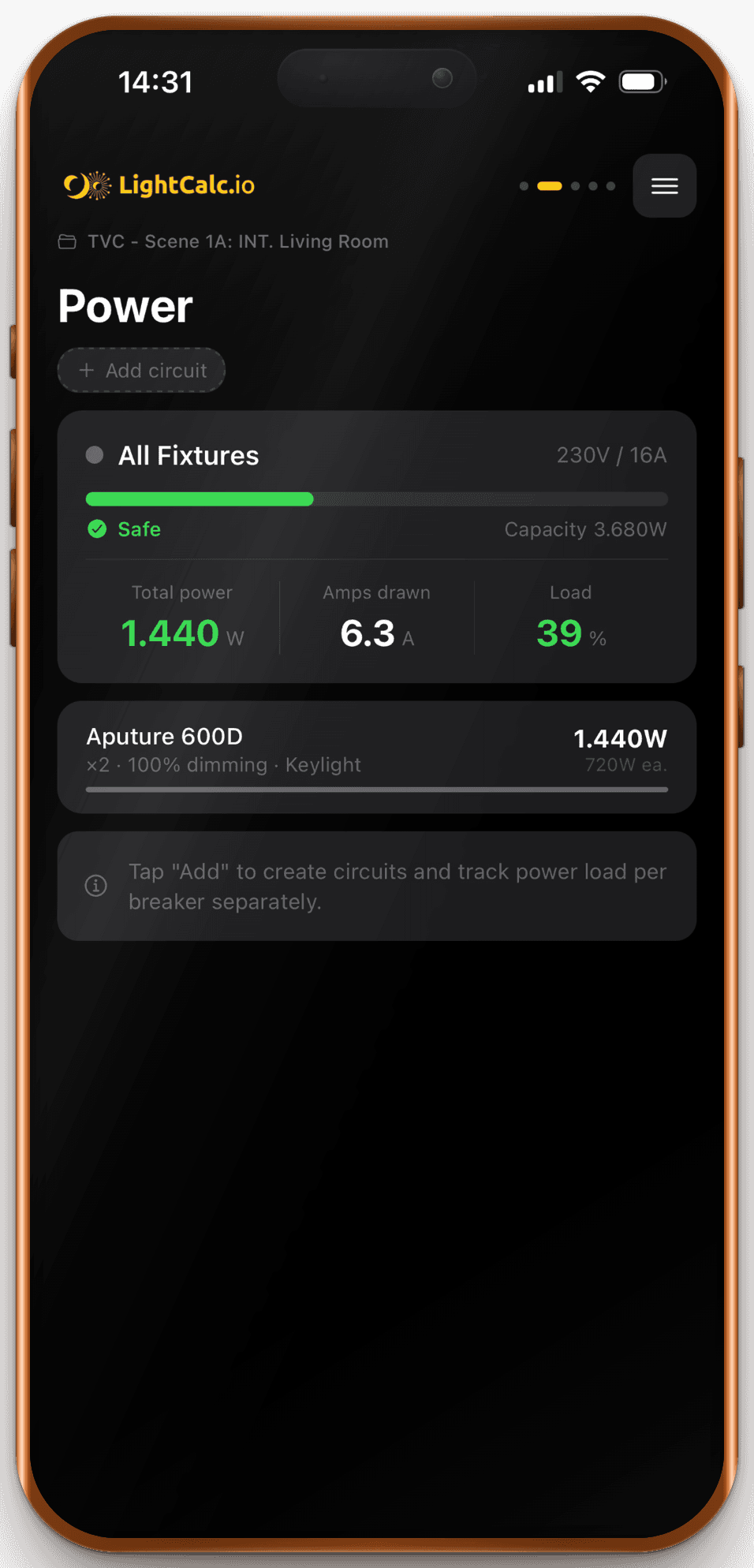
Total wattage and amperage at your selected dimmer level. Know before you arrive whether your location's supply can handle the load — and which breaker to ask for.
Custom fixtures & diffusion
Have a light not in the database? Add your own with a measured lux-at-1m value. Same for custom diffusion with your own stop-loss rating. It all flows through the same calculations.
Visual scene editor
Place your key, fill and backlight in an overhead 2D canvas. See beam angles, distances and coverage at a glance. Plan your lighting positions before the location scout ends.
All calculations use the inverse square law applied to manufacturer photometric lux-at-1m values — not estimates.
Fixture library
200+ fixtures. Real photometric data.
Lux-at-1m values from manufacturer spec sheets — run through the inverse square law.
- Arri ARRIMAX 12HMI
- Arri ARRIMAX 18HMI
- Arri M18 (1200W)HMI
- Arri M18 (1800W)HMI
- Arri M40 (2500W)HMI
- Arri M40 (4000W)HMI
- Arri M8HMI
- Arri M90 (6000W)HMI
- Arri M90 (9000W)HMI
- Mole-Richardson 12000W Daylite ParHMI
- Mole-Richardson 1200W Daylite ParHMI
- Mole-Richardson 12k Daylite FresnelHMI
- Mole-Richardson 18000W Daylite ParHMI
- Mole-Richardson 1800W Daylite ParHMI
- Mole-Richardson 18k Daylite FresnelHMI
- Mole-Richardson 24k Daylite FresnelHMI
- Mole-Richardson 2500W Daylite ParHMI
- Mole-Richardson 4000W Daylite ParHMI
- Mole-Richardson 575W Daylite ParHMI
- Mole-Richardson 6000W Daylite ParHMI
- Mole-Richardson 800W Daylite ParHMI
- Aladdin Bi-Fabric 1x4LED
- Aladdin Mosaic 2x4LED
- Aladdin Mosaic 3x6LED
- Aladdin Mosaic 4x4 (Pixel)LED
- Aladdin Mosaic Tube 4LED
- Aladdin Mosaic Tube 8LED
- Aputure 1200DLED
- Aputure 300DLED
- Aputure 300D IILED
Showing 30 of 226 fixtures & diffusions — select a category or search to explore the full library.
Plus 1,000+ modifier combinations and growing.
What filmmakers say
2,000+ filmmakers light with confidence
From student DPs to working cinematographers — across 20+ countries.
“This app is exactly what I wish I had years ago — looking forward to using it on set.”

“LightCalc allows us to work with precision, utilize our lighting budget efficiently and cut down on the guesswork during pre-production.”

“The Scenario Mode is a game-changer. I use it to dial in ND, ISO and T-stop, then audition lights to see what can punch through the sun. Starting with an M90 and working down lets me find the most efficient setup fast.”

Kurt Collins
@kurtcollins
“Super intuitive and fast — LightCalc reminded me how powerful good prep and lighting schemes can be. I'll definitely use it for my next big project.”

Luis J. Celdon
@__celdon
“I was able to tell my DP within a minute that our current lighting setup won't enable us to shoot at 200fps.”

“With LightCalc, I can plan my lighting setups with pinpoint accuracy — even calculating the exact dimming percentage of an LED fixture before I ever set foot on set.”

Vincent Eckert
@vincent_eckert_dp
“LightCalc is an immensely valuable tool and helps me make informed decisions when dealing with unfamiliar circumstances or last-minute requests on set.”

Philip Schwanke
@philipschwanke
“LightCalc has become a key part of my pre-production workflow. The insights I've been able to share with the production team have been incredibly valuable.”

Eric Kuritz
@erickuritz_camera
“It's a killer product — super helpful. If I was a dedicated DP I'd have it in my back pocket on every shoot.”

Mitchell Mullins
@mitchell_mullins
“Beautifully designed and easy to use — a sweet calculator app I'd 100% recommend.”


What filmmakers say
2,000+ filmmakers light with confidence
From student DPs to working cinematographers — across 20+ countries.
“This app is exactly what I wish I had years ago — looking forward to using it on set.”
“LightCalc allows us to work with precision, utilize our lighting budget efficiently and cut down on the guesswork during pre-production.”
“The Scenario Mode is a game-changer. I use it to dial in ND, ISO and T-stop, then audition lights to see what can punch through the sun. Starting with an M90 and working down lets me find the most efficient setup fast.”
Kurt Collins
@kurtcollins
“Super intuitive and fast — LightCalc reminded me how powerful good prep and lighting schemes can be. I'll definitely use it for my next big project.”
Luis J. Celdon
@__celdon
“I was able to tell my DP within a minute that our current lighting setup won't enable us to shoot at 200fps.”
“With LightCalc, I can plan my lighting setups with pinpoint accuracy — even calculating the exact dimming percentage of an LED fixture before I ever set foot on set.”
Vincent Eckert
@vincent_eckert_dp
“LightCalc is an immensely valuable tool and helps me make informed decisions when dealing with unfamiliar circumstances or last-minute requests on set.”
Philip Schwanke
@philipschwanke
“LightCalc has become a key part of my pre-production workflow. The insights I've been able to share with the production team have been incredibly valuable.”
Eric Kuritz
@erickuritz_camera
“It's a killer product — super helpful. If I was a dedicated DP I'd have it in my back pocket on every shoot.”
Mitchell Mullins
@mitchell_mullins
“Beautifully designed and easy to use — a sweet calculator app I'd 100% recommend.”
Used by students at




Why LightCalc
Why cinematographers use LightCalc every shoot
From student DPs to working gaffers — the same tool scales to every level of expertise.
Live output
Pricing
No credits. No BS. Own it, or go Plus.
Pay once and it's yours forever.
Education Program
LightCalc for film schools & universities.
Teaching cinematography shouldn't be limited by budget. Verified institutions get 50% off — with full access to every fixture, modifier and scenario.
50%
Institutional discount
6+
Film schools represented
Full
Feature access
Get academic pricing
Send us your institution name and we'll get you set up with verified educational access.
- Classroom & student licensing
- Cinematography & lighting courses
- No feature restrictions
FAQ
Common questions, answered
Everything you need to know about LightCalc before you get started.
Get started
Light your next project with precision.
Join 2,000+ cinematographers across 20+ countries who plan their shoots with real photometric data — not guesswork.
Free plan available — no credit card required.